Agenda
Installation
Basics
Iterables
Numpy (for math and matrix operations)
Matplotlib (for plotting)
Q&A
# Note: This tutorial is based on Python 3.8
#       but it should apply to all Python 3.X versions
# Please note that this tutorial is NOT exhaustive
# We try to cover everything you need for class assignments
# but you should also navigate external resources
#
# More tutorials:
# NUMPY:
# https://cs231n.github.io/python-numpy-tutorial/#numpy
# https://numpy.org/doc/stable/user/quickstart.html
# MATPLOTLIB:
# https://matplotlib.org/gallery/index.html
# BASICS:
# https://www.w3schools.com/python/
# CONSULT THESE WISELY:
# The official documentation, Google, and Stack-overflow are your friends!
1. Installation
Anaconda for environment management
common commands
conda env list <-- list all environments
conda create -n newenv python=3.8 <-- create new environment
conda enc create -f env.yml <-- create environment from config file
conda activate envname <-- activate a environment
conda deactivate <-- exit environment
pip install packagename <-- install package for current environment
jupyter notebook <-- open jupyter in current environment
Package installation using conda/pip
Live demo
Recommended IDEs
Spyder (in-built in Anaconda)
Pycharm (the most popular choice, compatible with Anaconda)
# common anaconda commands
#conda env list
#conda create -n name python=3.8
#conda env create -f env.yml
#conda activate python2.7
#conda deactivate
#install packages
#pip install <package>
2. Basics
# input and output
name = input()
print("hello, " + name)
print("print with new line")
print("print without new line", end="")
print()
print("print multiple variables separated by a space:", name, 1, 3.0, True)
# line comment
"""
block
comments
"""
# variables don't need explicit declaration
var = "hello" # string
var = 10.0    # float
var = 10      # int
var = True    # boolean
var = [1,2,3] # pointer to list
var = None    # empty pointer
# type conversions
var = 10
print(int(var))
print(str(var))
print(float(var))
# basic math operations
var = 10
print("var + 4 =", 10 + 4)
print("var - 4 =", 10 - 4)
print("var * 4 =", 10 * 4)
print("var ^ 4=", 10 ** 4)
print("int(var) / 4 =", 10//4)   # // for int division
print("float(var) / 4 =", 10/4)  # / for float division
# All compound assignment operators available
# including += -= *= **= /= //=
# pre/post in/decrementers not available (++ --)
# basic boolean operations include "and", "or", "not"
print("not True is", not True)
print("True and False is", True and False)
print("True or False is", True or False)
# String operations
# '' and "" are equivalent
s = "String"
#s = 'Mary said "Hello" to John'
#s = "Mary said \"Hello\" to John"

# basic
print(len(s)) # get length of string and any iterable type
print(s[0]) # get char by index
print(s[1:3]) # [1,3)
print("This is a " + s + "!")

# handy tools
print(s.lower())
print(s*4)
print("ring" in s)
print(s.index("ring"))

# slice by delimiter
print("I am a sentence".split(" "))
# concatenate a list of string using a delimiter
print("...".join(['a','b','c']))

# formatting variables
print("Formatting a string like %.2f"%(0.12345))
print(f"Or like {s}!")
# control flows
# NOTE: No parentheses or curly braces
#       Indentation is used to identify code blocks
#       So never ever mix spaces with tabs
for i in range(0,5):
    for j in range(i, 5):
        print("inner loop")
    print("outer loop")
# if-else
var = 10
if var > 10:
    print(">")
elif var == 10:
    print("=")
else:
    print("<")
# use "if" to check null pointer or empty arrays
var = None
if var:
    print(var)
var = []
if var:
    print(var)
var = "object"
if var:
    print(var)
# while-loop
var = 5
while var > 0:
    print(var)
    var -=1
# for-loop
for i in range(3):  # prints 0 1 2
    print(i)

"""
equivalent to
for (int i = 0; i < 3; i++)
"""
print("-------")
# range (start-inclusive, stop-exclusive, step)
for i in range(2, -3, -2):
    print(i)
"""
equivalent to
for (int i = 2; i > -3; i-=2)
"""
# define function
def func(a, b):
    return a + b
func(1,3)
# use default parameters and pass values by parameter name
def rangeCheck(a, min_val = 0, max_val=10):
    return min_val < a < max_val    # syntactic sugar
rangeCheck(5, max_val=4)
# define class
class Foo:

    # optinal constructor
    def __init__(self, x):
        # first parameter "self" for instance reference, like "this" in JAVA
        self.x = x

    # instance method
    def printX(self): # instance reference is required for all function parameters
        print(self.x)

    # class methods, most likely you will never need this
    @classmethod
    def printHello(self):
        print("hello")

obj = Foo(6)
obj.printX()
# class inheritance - inherits variables and methods
# You might need this when you learn more PyTorch
class Bar(Foo):
    pass
obj = Bar(3)
obj.printX()
3. Iterables
alist = list()  # linear, size not fixed, not hashable
atuple = tuple() # linear, fixed size, hashable
adict = dict()  # hash table, not hashable, stores (key,value) pairs
aset = set()    # hash table, like dict but only stores keys
acopy = alist.copy() # shallow copy
print(len(alist)) # gets size of any iterable type
# examplar tuple usage
# creating a dictionary to store ngram counts
d = dict()
d[("a","cat")] = 10
d[["a","cat"]] = 11
"""
List: not hashable (i.e. can't use as dictionary key)
      dynamic size
      allows duplicates and inconsistent element types
      dynamic array implementation
"""
# list creation
alist = []          # empty list, equivalent to list()
alist = [1,2,3,4,5] # initialized list

print(alist[0])
alist[0] = 5
print(alist)

print("-"*10)
# list indexing
print(alist[0]) # get first element (at index 0)
print(alist[-2]) # get last element (at index len-1)
print(alist[3:]) # get elements starting from index 3 (inclusive)
print(alist[:3]) # get elements stopping at index 3 (exclusive)
print(alist[2:4]) # get elements within index range [2,4)
print(alist[6:]) # prints nothing because index is out of range
print(alist[::-1]) # returns a reversed list

print("-"*10)
# list modification
alist.append("new item") # insert at end
alist.insert(0, "new item") # insert at index 0
alist.extend([2,3,4]) # concatenate lists
# above line is equivalent to alist += [2,3,4]
alist.index("new item") # search by content
alist.remove("new item") # remove by content
alist.pop(0) # remove by index
print(alist)

print("-"*10)
if "new item" in alist:
    print("found")
else:
    print("not found")

print("-"*10)
# list traversal
for ele in alist:
    print(ele)

print("-"*10)
# or traverse with index
for i, ele in enumerate(alist):
    print(i, ele)
"""
Tuple: hashable (i.e. can use as dictionary key)
       fixed size (no insertion or deletion)
"""
# it does not make sense to create empty tuples
atuple = (1,2,3,4,5)
 # or you can cast other iterables to tuple
atuple = tuple([1,2,3])

# indexing and traversal are same as list
"""
Named tuples for readibility
"""
from collections import namedtuple
Point = namedtuple('Point', 'x y')
pt1 = Point(1.0, 5.0)
pt2 = Point(2.5, 1.5)
print(pt1.x, pt1.y)
"""
Dict: not hashable
      dynamic size
      no duplicates allowed
      hash table implementation which is fast for searching
"""
# dict creation
adict = {} # empty dict, equivalent to dict()
adict = {'a':1, 'b':2, 'c':3}
print(adict)

# get all keys in dictionary
print(adict.keys())

# get value paired with key
print(adict['a'])
key = 'e'

# NOTE: accessing keys not in the dictionary leads to exception
if key in adict:
    print(adict[key])

# add or modify dictionary entries
adict['e'] = 10 # insert new key
adict['e'] = 5  # modify existing keys

print("-"*10)
# traverse keys only
for key in adict:
    print(key, adict[key])

print("-"*10)
# or traverse key-value pairs together
for key, value in adict.items():
    print(key, value)

print("-"*10)
# NOTE: Checking if a key exists
key = 'e'
if key in adict: # NO .keys() here please!
    print(adict[key])
else:
    print("Not found!")
"""
Special dictionaries
"""
# set is a dictionary without values
aset = set()
aset.add('a')

# deduplication short-cut using set
alist = [1,2,3,3,3,4,3]
alist = list(set(alist))
print(alist)

# default_dictionary returns a value computed from a default function
#     for non-existent entries
from collections import defaultdict
adict = defaultdict(lambda: 'unknown')
adict['cat'] = 'feline'
print(adict['cat'])
print(adict['dog'])
# counter is a dictionary with default value of 0
#     and provides handy iterable counting tools
from collections import Counter

# initialize and modify empty counter
counter1 = Counter()
counter1['t'] = 10
counter1['t'] += 1
counter1['e'] += 1
print(counter1)
print("-"*10)

# initialize counter from iterable
counter2 = Counter("letters to be counted")
print(counter2)
print("-"*10)

# computations using counters
print("1", counter1 + counter2)
print("2,", counter1 - counter2)
print("3", counter1 or counter2) # or for intersection, and for union
# sorting
a = [4,6,1,7,0,5,1,8,9]
a = sorted(a)
print(a)
a = sorted(a, reverse=True)
print(a)
# sorting
a = [("cat",1), ("dog", 3), ("bird", 2)]
a = sorted(a)
print(a)
a = sorted(a, key=lambda x:x[1])
print(a)
# useful in dictionary sorting
adict = {'cat':3, 'bird':1}
print(sorted(adict.items(), key=lambda x:x[1]))
# Syntax sugar: one-line control flow + list operation
x = [1,2,3,5,3]
"""
for i in range(len(sent)):
    sent[i] = sent[i].lower().split(" ")
"""
x1 = [xx*3 + 5 for xx in x]
print(x1)

x2 = [xx*3 + 5 for xx in x if xx < 3]
print(x2)

# Use this for deep copy!
# copy = [obj.copy() for obj in original]
# Syntax sugar: * operator for repeating iterable elements
print("-"*10)
print([1]*10)

# Note: This only repeating by value
#       So you cannot apply the trick on reference types

# To create a double list
# DONT
doublelist = [[]]*10
doublelist[0].append(1)
print(doublelist)
# DO
doublelist = [[] for _ in range(10)]
doublelist[0].append(1)
print(doublelist)
4. Numpy
Very powerful python tool for handling matrices and higher dimensional arrays
import numpy as np
# create arrays
a = np.array([[1,2],[3,4],[5,6]])
print(a)
print(a.shape)
# create all-zero/one arrays
b = np.ones((3,4)) # np.zeros((3,4))
print(b)
print(b.shape)
# create identity matrix
c = np.eye(5)
print(c)
print(c.shape)
# create random matrix with standard normal init
d = np.random.normal(size=(5,5))
print(d)
# reshaping arrays
a = np.arange(8)         # [8,] all vectors are column by default
b = a.reshape(1,-1)      # [1,8] row vector -- -1 for auto-fill
c = a.reshape((4,2))     # shape [4,2]
d = a.reshape((2,2,-1))  # shape [2,2,2]
e = c.flatten()          # shape [8,]
f = np.expand_dims(a, 0) # [1,8]
g = np.expand_dims(a, 1) # [8,1]
h = e.squeeze()          # shape[8, ]    -- remove all unnecessary dimensions
print(a)
print(b)
# be careful about vectors!
a = np.array([1,2,3]) # this is a 3-d column vector, which you cannot transpose
print(a)
print(a.shape)
print(a.T.shape)
a = a.reshape(-1, 1) # this is a 3x1 matrix, which you can transpose
print(a)
print(a.shape)
print(a.T.shape)
# concatenating arrays
a = np.ones((4,3))
b = np.ones((4,3))
c = np.concatenate([a,b], 0)
print(c.shape)
d = np.concatenate([a,b], 1)
print(d.shape)
# access array slices by index
a = np.zeros([10, 10])
a[:3] = 1
a[:, :3] = 2
a[:3, :3] = 3
rows = [4,6,7]
cols = [9,3,5]
a[rows, cols] = 4
print(a)
# transposition
a = np.arange(24).reshape(2,3,4)
print(a.shape)
print(a)
a = np.transpose(a, (2,1,0)) # swap 0th and 2nd axes
print(a.shape)
print(a)
c = np.array([[1,2],[3,4]])
print(np.linalg.inv(c))
# pinv is pseudo inversion for stability
print(np.linalg.pinv(c))
# To compute c^-1 b
b = np.array([1, 1])
print(np.linalg.inv(c)@b)
print(np.linalg.solve(c,b)) # preferred!
# vector dot product
v1 = np.array([1,2])
v2 = np.array([3,4])
print(v1.dot(v2))
print(np.dot(v1,v2))
print(v1@v2)
# vector outer product
print(np.outer(v1,v2))
print(v1.reshape(-1,1).dot(v2.reshape(1,-1)))
# Matrix multiply vector (Ax)
m = np.array([1,2,3,4]).reshape(2,2)
print(m@v1)
print(m.dot(v1))
print(np.matmul(m, v1))
# matrix multiplication
a = np.ones((4,3)) # 4,3
b = np.ones((3,2)) # 3,2 --> 4,2
print(a @ b)       # same as a.dot(b)
print(np.matmul(a,b))
# broadcasting
c = np.ones([4,4])
# automatic repetition along axis
d = np.array([1,2,3,4]).reshape(4,1)
print(c.shape)
print(d.shape)
print(c + d)
# computing pairwise distance (using broadcasting)
samples = np.random.random([15, 5])
diff=samples[:,np.newaxis,:]-samples[np.newaxis]
print(samples[:,np.newaxis,:].shape)
print(samples[np.newaxis,:,:].shape)
print(diff.shape)
# speed test: numpy vs list
a = np.ones((100,100))
b = np.ones((100,100))

def matrix_multiplication(X, Y):
    result = [[0]*len(Y[0]) for _ in range(len(X))]
    for i in range(len(X)):
        for j in range(len(Y[0])):
            for k in range(len(Y)):
                result[i][j] += X[i][k] * Y[k][j]
    return result

import time

# run numpy matrix multiplication for 10 times
start = time.time()
for _ in range(10):
    a @ b
end = time.time()
print("numpy spends {} seconds".format(end-start))

# run list matrix multiplication for 10 times
start = time.time()
for _ in range(10):
    matrix_multiplication(a,b)
end = time.time()
print("list operation spends {} seconds".format(end-start))

# the difference gets more significant as matrices grow in size!
# other common operations
a = np.ones((4,4))
print(np.linalg.norm(a, axis=0))
print(np.linalg.norm(a))
print(np.sum(a)) # sum all elements in matrix
print(np.sum(a, axis=0)) # sum along axis 0
print(np.sum(a, axis=1)) # sum along axis 1
# element-wise operations, for examples
print(np.log(a))
print(np.exp(a))
print(np.sin(a))
# operation with scalar is interpreted as element-wise
print(a * 3)
# invalid operations result in an NaN
a = np.array(0)
b = np.array(0)
print(a/b)
5. Matplotlib
Powerful tool for visualization
Many tutorials online. We only go over the basics here
import matplotlib.pyplot as plt
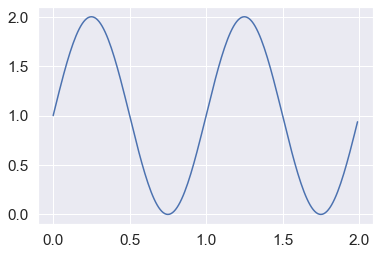
# line plot
x = np.arange(0, 2, 0.01)
y = 1+np.sin(2*np.pi*x)
plt.plot(x,y)
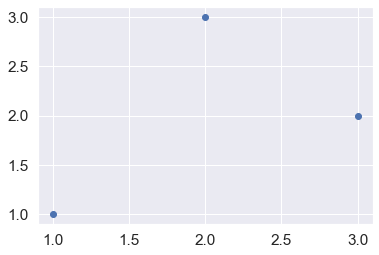
# scatter plot
x = [1,3,2]
y = [1,2,3]
plt.scatter(x,y)
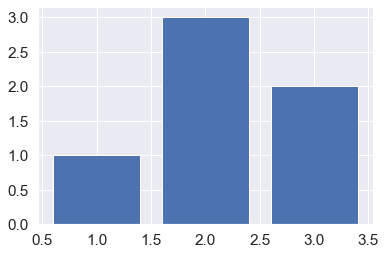
# bar plots
plt.bar(x,y)
# plot configurations
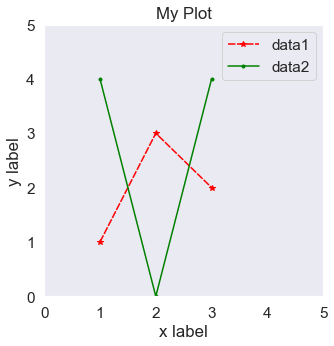
x = [1,2,3]
y1 = [1,3,2]
y2 = [4,0,4]

# set figure size
plt.figure(figsize=(5,5))

# set axes
plt.xlim(0,5)
plt.ylim(0,5)
plt.xlabel("x label")
plt.ylabel("y label")

# add title
plt.title("My Plot")

plt.plot(x,y1, label="data1", color="red", marker="*", dashes=[5,1])
plt.plot(x,y2, label="data2", color="green", marker=".")
plt.grid()
plt.legend()
# subplots
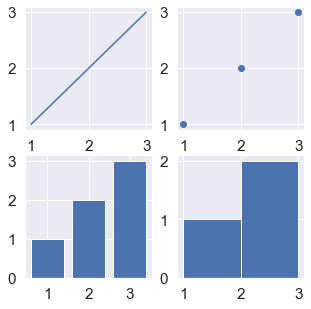
f, ax = plt.subplots(2,2,figsize=(5,5))
ax[0][0].plot(x,y)
ax[0][1].scatter(x,y)
ax[1][0].bar(x,y)
ax[1][1].hist(x,y)
plt.show()
# plot area under curve
probs = [1, 1, 0.95, 0.9, 0.9, 0.8, 0.7, 0.6, 0.5, 0.4]
thres = np.arange(0,1,0.1)
plt.fill_between(x=thres, y1=probs, y2=0, step='post')

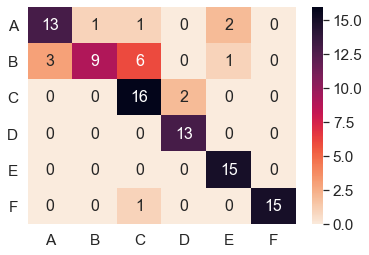
import seaborn as sn
import matplotlib.pyplot as plt

array = [[13,1,1,0,2,0],
         [3,9,6,0,1,0],
         [0,0,16,2,0,0],
         [0,0,0,13,0,0],
         [0,0,0,0,15,0],
         [0,0,1,0,0,15]]
labels = 'A B C D E F'.split(' ')
sn.heatmap(array, annot=True, annot_kws={"size": 16}, cmap="rocket_r")
plt.xticks(ticks=np.arange(len(labels))+0.5,labels=labels)
plt.yticks(ticks=np.arange(len(labels))+0.5,labels=labels,rotation=0)
plt.show()